
Sync Campaign Response with Webhook
Using webhook sync allows you to send campaign response to specified URL. This method is flexible and allows you to send campaign response to third party platforms that doesn't have direct integration with OnVoard.
Edit campaign and select Sync. Then locate Webhook and turn it on.
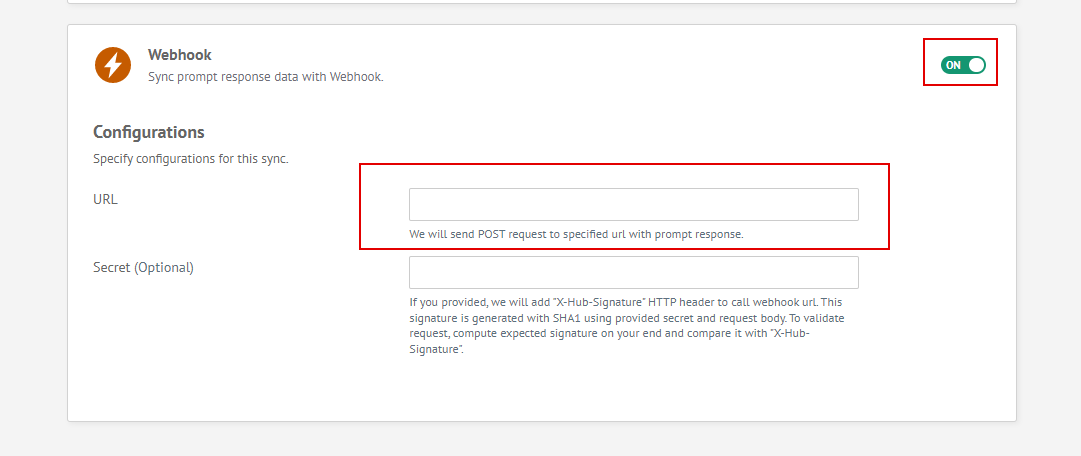
- URL - Required field that needs to be specified. We will send POST request to specified url.
- Secret - This is an optional field. If specified, we will add "X-Hub-Signature" HTTP header to call webhook url. This signature is generated with SHA1 using provided secret and request body. To validate request, compute expected signature on your end and compare it with "X-Hub-Signature".
Below is a sample of how webhook payload looks like
{
  "id": "pmtresp_4ubw80ytdw2y305",
  "prompt_id": "pmt_ufclfbytbqq8knu",
  "prompt_name": "Email Capture",
  "created_datetime": 1641237756,
  "modified_datetime": 1641237756,
  "data": {
    "name": "John Doe",
    "email": "[email protected]"
  }
}
View Sync Status
We provide sync logs which allows you to check sync status.
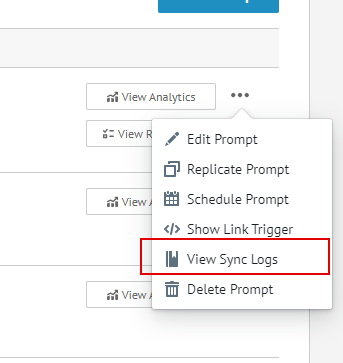
From campaigns page, identify campaign to inspect and select View Sync Logs. This will bring you to sync logs page which will allow you to view status for each sync.
