
Saved pages, rows and elements
Build a page, a row, or a single element once, and save it to drop into any other ActionPop campaign on your account without rebuilding it.
Skip this and you're redoing the same header, the same offer row, on every new campaign, time wasted that a save avoids entirely.
What you can save
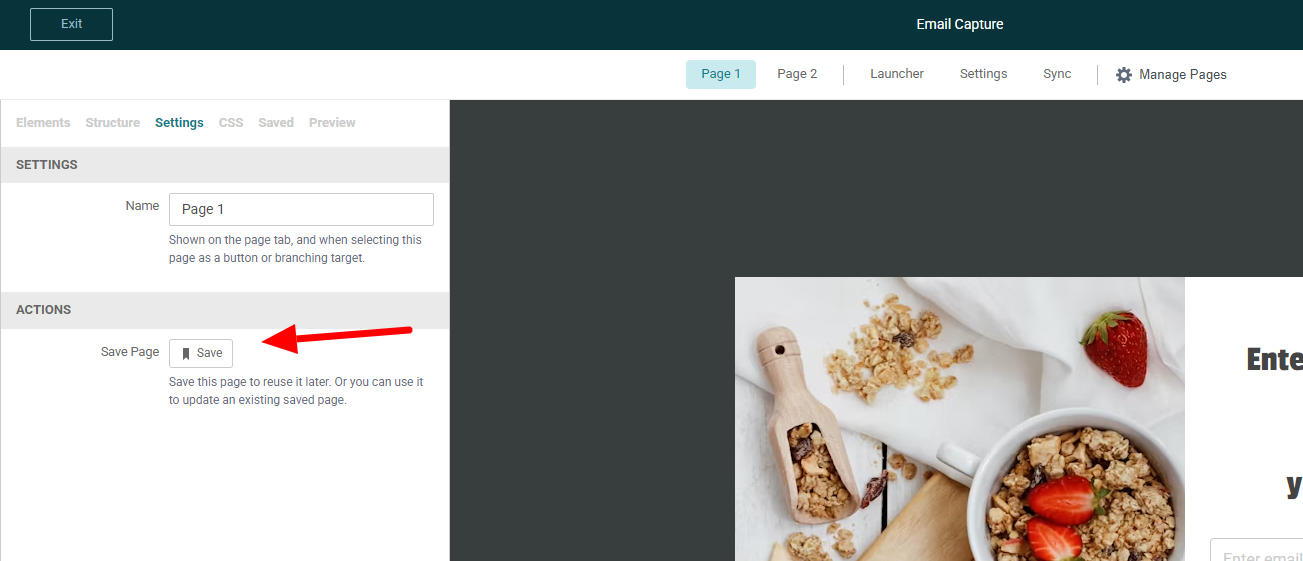
You can save a Page, a Row, or a single Element. Select a row or an element on the canvas and the sidebar's Actions section shows a Save button, labeled Save Row or Save Element depending on what's selected.
A page saves the same way, or from the small save icon next to any page in Manage Pages. There's no right-click menu for this. Selecting the thing you want is the only path.
Naming a save
The first time you save a Page, a Row or an Element, you'll just be asked for a Name. It has to be unique among your other saves of that same kind, so a Row called "Free Shipping Banner" and an Element called the same thing don't clash.
Once you've got an existing save of that kind, the modal also offers Save as New or Update Existing.
Update Existing overwrites a save you already made. That's the one to use once you've tweaked a row you reuse often, so every future insert starts from the new version.
Reusing a saved row or element
Open the sidebar's Saved tab and you'll find your saves grouped into Rows and Elements, searchable by name.
Drag one onto the canvas the same way you'd drag a fresh element in from the palette. This works in any campaign on your account, not just the one you saved it from.
Reusing a saved page
Pages don't show up in that palette, there's nowhere on a canvas to drop one. Instead, open Add Page and choose Add Saved Page, then pick from the list. Each one shows a thumbnail so you can tell them apart.
What actually carries over
Everything you built, not just the layout. Text, images, links, form fields, coupon settings, the works, all come along.
A saved row or element leaves out the page's own custom CSS and any "Go to Page" actions, since neither means anything outside the page it came from. OnVoard tells you this at save time, not after.
Every insert is its own independent copy from the moment it lands. Edit the original save later, or delete it outright, and nothing changes in a campaign you already built from it.
And if a "Go to Page" action on a saved row pointed somewhere that doesn't exist in the campaign you're pasting it into? OnVoard clears that link and tells you, rather than leaving one that goes nowhere.
Renaming and deleting a save
Find every page, row and element you've saved, across every campaign, under Saved Items in the console sidebar.
Rename them there, or delete one you no longer need. A campaign you already built from a save keeps everything it has, whatever you do to the save afterward.
What's Next
We recommend reading the following articles to further understand how you can build out your campaigns.
